Choosing the right accounting software is one of the most important decisions for any business. Two of the most popular options available today are Xero and QuickBooks.
Both platforms offer powerful tools for managing finances, but they differ in pricing, features, usability, and overall value. In this detailed comparison, we’ll break down everything you need to know so you can decide which one is right for your business.
Overview of Xero and QuickBooks
What Is Xero?
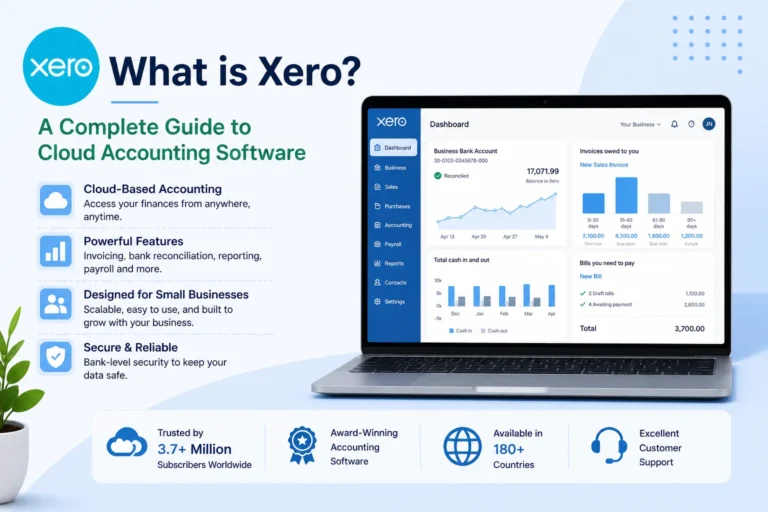
Xero is a cloud-based accounting platform designed for small to medium-sized businesses. It focuses on automation, simplicity, and collaboration, making it a popular choice for growing teams.
What Is QuickBooks?
QuickBooks, developed by Intuit, is one of the most widely used accounting tools globally. It offers a comprehensive set of features and is especially popular among small businesses and accountants.
Both tools handle core accounting tasks like invoicing, expense tracking, reporting, and tax management. (Forbes)
Xero vs QuickBooks: Key Differences at a Glance
| Feature | Xero | QuickBooks |
|---|---|---|
| Cloud-Based | Yes | Yes |
| Users | Unlimited | Limited by plan |
| Starting Price | Lower | Higher |
| Ease of Use | Moderate | Easier |
| Integrations | 600+ | 800+ |
| Customer Support | Limited direct support | Phone + chat support |
| Best For | Teams & global use | Beginners & US businesses |
Features Comparison
1. Core Accounting Features
Both Xero and QuickBooks offer essential accounting tools:
- Invoicing
- Expense tracking
- Bank reconciliation
- Financial reporting
- Tax management
Verdict: Tie
Both platforms handle core accounting extremely well. (Forbes)
2. Invoicing & Payments
- Xero: Clean invoicing interface, easy automation
- QuickBooks: More customization and advanced options
Winner: QuickBooks
It offers slightly more control and flexibility.
3. Bank Reconciliation
Both tools connect to bank accounts and automatically match transactions.
- Xero connects with thousands of global institutions
- QuickBooks has a more polished dashboard
Winner: QuickBooks (slightly)
Better interface and usability. (Forbes)
4. Integrations
- Xero: ~600 integrations
- QuickBooks: 800+ integrations
Winner: QuickBooks
More integrations and stronger automation tools. (Forbes)
5. Reporting & Analytics
- QuickBooks offers deeper financial insights
- Xero provides strong but simpler reports
Winner: QuickBooks
Better for advanced financial analysis.
6. Inventory Management
- Xero: Limited, often requires add-ons
- QuickBooks: Built-in inventory features
Winner: QuickBooks
Better for product-based businesses.
Pricing Comparison
Pricing is one of the biggest differences between the two platforms.
Xero Pricing
- Early Plan: ~$25/month
- Growing Plan: ~$55/month
- Established Plan: ~$90/month
- Unlimited users on all plans
QuickBooks Pricing
- Simple Start: ~$38/month (1 user)
- Essentials: ~$75/month (3 users)
- Plus: ~$115/month (5 users)
- Advanced: ~$275/month (25 users)
Winner: Xero
It is more cost-effective, especially for teams. (Forbes)
Ease of Use
Xero
- Clean and modern interface
- Slight learning curve
QuickBooks
- More intuitive and beginner-friendly
- Better dashboard design
Winner: QuickBooks
Easier for beginners to navigate. (Forbes)
Customer Support
Xero
- Email and ticket-based support
- Limited direct phone support
QuickBooks
- Phone support
- Live chat
- Extensive help resources
Winner: QuickBooks
Stronger and more accessible support system. (NerdWallet)
User Limits
- Xero: Unlimited users on all plans
- QuickBooks: Limited users depending on plan
Winner: Xero
Ideal for growing teams and collaboration. (Forbes)
Mobile App Comparison
Both platforms offer mobile apps:
- QuickBooks: More feature-rich
- Xero: Cleaner interface
Winner: QuickBooks
More functionality on mobile.
Pros and Cons
Xero Pros
- Unlimited users
- Lower pricing
- Strong automation
- Great for international businesses
Xero Cons
- Less intuitive interface
- Limited direct support
- Some features require add-ons
QuickBooks Pros
- Easy to use
- Powerful features
- Better reporting
- Strong customer support
QuickBooks Cons
- Expensive
- User limits
- Costs increase with scaling
Who Should Choose Xero?
Xero is best for:
- Growing teams
- Businesses with multiple users
- International businesses
- Budget-conscious users
Who Should Choose QuickBooks?
QuickBooks is best for:
- Beginners
- Solo entrepreneurs
- Businesses needing advanced reporting
- Users who want strong support
Final Verdict: Xero vs QuickBooks
Both Xero and QuickBooks are excellent accounting platforms, and the right choice depends on your needs.
Choose Xero if:
- You want better pricing
- You need unlimited users
- You operate internationally
Choose QuickBooks if:
- You want ease of use
- You need advanced features
- You prefer strong customer support
Conclusion
There is no one-size-fits-all answer when comparing Xero vs QuickBooks. Both platforms offer powerful accounting solutions with unique strengths.
If you value affordability and collaboration, Xero is a great option. If you prioritize usability and advanced features, QuickBooks may be the better choice.
The best approach is to evaluate your business needs carefully and choose the platform that aligns with your workflow and budget.